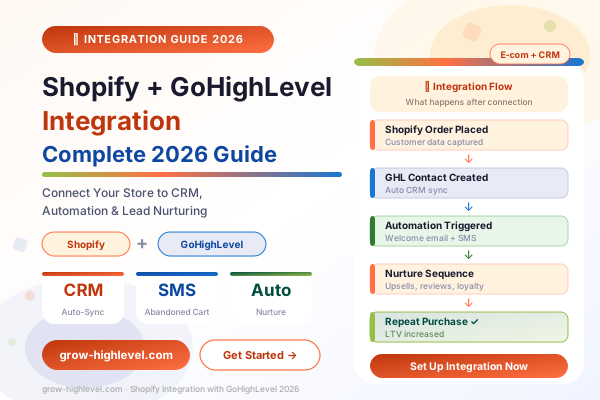
Shopify Integrated with GoHighLevel: Complete Setup & Automation Guide (2026)
If you run a Shopify store, you already have a solid e-commerce foundation. You have products listed, payments connected, and customers placing orders. What most Shopify store owners do not have is a proper system for what happens after the order — and that gap costs them significantly more revenue than most realise.
GoHighLevel fills that gap. When Shopify is integrated with GoHighLevel, every customer transaction becomes the starting point for an automated marketing sequence that recovers abandoned carts, sends post-purchase nurture emails and SMS, requests reviews, upsells related products, and keeps customers engaged until they buy again.
This guide covers exactly how the integration works, why it matters for your store's revenue, how to set it up, and the five specific automation workflows every Shopify store owner should build inside GoHighLevel.
Why Shopify Alone Is Not Enough
Shopify is excellent at processing orders. It is not built to be a CRM, an email and SMS marketing platform, an abandoned cart recovery engine, or a customer relationship management system. Shopify's built-in email is basic. Its automation is limited. Its SMS capabilities require additional apps with separate monthly fees.
The result is that most Shopify stores are leaving 20 to 40 percent of potential revenue on the table — from customers who started checkout and left, from one-time buyers who never came back, from satisfied customers who would have left a review if someone had simply asked them.
GoHighLevel solves all of this with one platform. When Shopify is integrated with GoHighLevel, your customer data syncs automatically, your automations trigger based on specific purchase events, and your marketing runs in the background 24 hours a day without any manual effort.
What Is the Shopify GoHighLevel Integration?
The Shopify GoHighLevel integration connects your Shopify store to the GoHighLevel CRM and automation platform using either GoHighLevel's native Shopify connection, a third-party integration via Zapier or n8n, or a custom webhook setup.
When the integration is active, the following happens automatically:
Every new customer in Shopify creates a contact in GoHighLevel
Order details — product purchased, order value, date — sync to the contact record
Tags are applied automatically based on purchase behaviour
Automation workflows trigger based on specific order events
Abandoned checkouts fire a recovery sequence
Post-purchase workflows begin immediately after an order is confirmed
From GoHighLevel's side, you can see each customer's full purchase history, segment your contact list by purchase behaviour, and send targeted email and SMS campaigns to the right customers at exactly the right time.
How to Connect Shopify to GoHighLevel
There are three main methods for setting up the Shopify GoHighLevel integration, depending on your technical comfort level and how deeply you want the two platforms connected.
Method 1 — GoHighLevel Native Integration
GoHighLevel has a built-in Shopify integration available inside Settings → Integrations. This is the cleanest option and requires no third-party tools.
To connect:
Go to your GoHighLevel sub-account
Navigate to Settings → Integrations
Find Shopify in the integrations list
Enter your Shopify store URL and authenticate
Configure which events trigger GoHighLevel actions — new customer, order created, abandoned checkout
Once connected, new customers and orders flow directly into GoHighLevel without any middleware.
Method 2 — Zapier Integration
If you need more custom trigger and action logic, connecting Shopify to GoHighLevel through Zapier gives you greater control over which Shopify events fire which GoHighLevel actions.
Common Zaps for this integration include:
New Shopify order → Create or update GoHighLevel contact
Shopify abandoned checkout → Add contact to abandoned cart workflow
Shopify refund → Tag contact and pause promotional sequences
Shopify customer tag added → Trigger GoHighLevel automation
Zapier requires a paid account for multi-step automations, but the setup is straightforward and does not require any coding.
Method 3 — Webhook + n8n (Advanced)
For agencies building complex e-commerce automation systems, connecting Shopify and GoHighLevel using Shopify webhooks and n8n gives complete flexibility. This method allows you to pass custom data fields, apply conditional logic, and build automation flows that neither Zapier nor the native integration supports.
This approach requires technical knowledge but creates the most powerful GoHighLevel ecommerce CRM system possible.
For a full overview of GoHighLevel's automation capabilities, see our GoHighLevel automation workflows guide.
5 Ways to Use Shopify + GoHighLevel
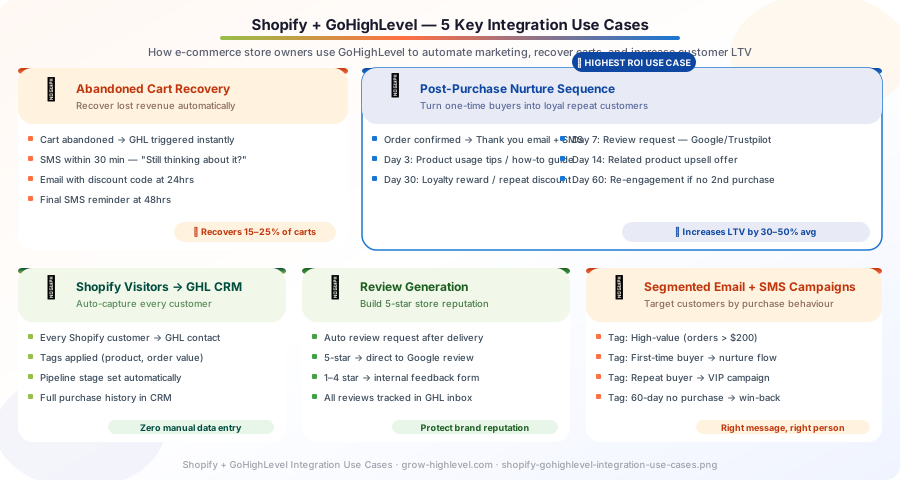
1. Abandoned Cart Recovery
This is the single highest-ROI automation you can build with the Shopify GoHighLevel integration. Industry data consistently shows that 70% of e-commerce shoppers abandon their cart before completing a purchase. Without an automated recovery sequence, most of those customers are lost permanently.
With GoHighLevel, every abandoned checkout in Shopify triggers a multi-channel recovery sequence automatically:
30 minutes: SMS — "Hey [name], you left something in your cart. Still interested?" with a direct link back to checkout
2 hours: Email — reminder with product image and cart contents
24 hours: SMS with a limited-time discount code if no purchase
48 hours: Final email with urgency — "Your cart expires soon"
Stores using this workflow typically recover 15 to 25 percent of abandoned carts, representing thousands of dollars in additional monthly revenue that was previously being lost silently.
The key advantage GoHighLevel has over Shopify's built-in abandoned cart emails is the SMS channel. Most shoppers do not open abandoned cart emails. An SMS from your brand within 30 minutes of abandoning a cart has a 98 percent open rate and generates significantly more recovery conversions.
For the automation side of this to work correctly, your GoHighLevel CRM needs to be properly configured first. Read our GoHighLevel CRM setup guide if you have not yet built your contact pipeline.
2. Post-Purchase Nurture Sequence
The most valuable customer a Shopify store has is someone who already bought. They trusted your brand enough to complete a purchase — the cost of converting them again is a fraction of acquiring a new customer.
A GoHighLevel post-purchase nurture sequence keeps that relationship active automatically:
Day 0 (Order confirmed): Thank you SMS with order confirmation and expected delivery date
Day 2: Email with product usage tips, care instructions, or a how-to guide relevant to what they purchased
Day 5: SMS checking in — "How is [product] working for you?"
Day 7: Review request email — "If you are happy with your order, we would love a quick review"
Day 14: Upsell email featuring related products based on their purchase
Day 30: Loyalty reward — discount code for their next order
Day 60: Re-engagement SMS if no second purchase — "We miss you — here is an exclusive offer"
This entire sequence runs automatically for every customer from the moment their order is confirmed. Over time, it consistently increases average customer lifetime value by 30 to 50 percent compared to stores running no post-purchase automation.
3. Shopify Customer CRM Sync
When Shopify is integrated with GoHighLevel, your contact database becomes genuinely useful. Rather than a flat list of past buyers, you have a segmented CRM where each contact is tagged based on their purchase behaviour and managed through a structured pipeline.
Tags applied automatically through the integration might include:
These tags allow you to send precisely targeted campaigns to specific customer segments rather than blasting your entire list with the same message. A customer tagged as VIP should receive different communication than someone tagged as Abandoned Cart.
4. Review and Reputation Management
For Shopify stores competing in crowded niches, customer reviews are one of the most powerful trust signals available. GoHighLevel's reputation management feature automates the review collection process entirely.
Seven days after delivery confirmation (or any time delay you choose), GoHighLevel sends a review request SMS asking the customer to rate their experience. Customers who respond with a high rating are directed to your Google Business profile, Trustpilot, or a review platform of your choice. Customers who respond with a low rating are directed to a private feedback form that captures their concern before it becomes a public negative review.
This approach — directing satisfied customers to public review platforms while capturing dissatisfied customers privately — builds your public review score consistently without suppressing genuine feedback.
5. Segmented Email and SMS Campaigns
Beyond automated sequences, the Shopify GoHighLevel sync allows you to run highly targeted broadcast campaigns to specific customer segments.
Because every customer's purchase history lives in GoHighLevel, you can send campaigns like:
Product-specific campaigns: "We just released an upgrade to the [product they bought] — here is your exclusive early access"
Seasonal re-engagement: Send a summer campaign only to customers who bought seasonal items
High-value customer VIP offers: Give your top spenders early access to sales or exclusive products
Win-back campaigns: Target customers who have not purchased in 90 days with a time-limited offer
None of this requires manually exporting lists from Shopify or uploading them to a separate email tool. Because the data lives in GoHighLevel, you filter your contacts by tag, build your campaign, and send — all from the same platform.
What You Need Before Setting Up the Integration
Before connecting Shopify to GoHighLevel, confirm the following:
An active GoHighLevel account on the Starter plan or above
A live Shopify store with at least basic products and payment configured
Your GoHighLevel CRM configured with the correct pipeline stages and contact tags
Your sending domain connected in GoHighLevel for email deliverability
Your phone number connected in GoHighLevel for SMS
If your GoHighLevel account is not yet properly configured, the integration will connect but your automations will not work correctly. Getting the foundation right first saves significant troubleshooting time later.
For a complete breakdown of GoHighLevel plans and which plan covers e-commerce integrations, see the GoHighLevel pricing plans guide.
Common Mistakes to Avoid
Not mapping customer tags correctly: If you connect Shopify and GoHighLevel without defining your tag structure in advance, you end up with a CRM full of contacts with no segmentation. Build your tag logic before you import any data.
Building automations before testing the sync: Always verify that a test Shopify order creates the correct contact in GoHighLevel with the correct tags before activating live workflows. A misconfigured trigger can send messages to the wrong contacts.
Using GoHighLevel email without a sending domain: GoHighLevel's email deliverability depends on a properly configured sending domain. Sending from an unverified domain causes emails to land in spam, which makes your post-purchase sequences invisible.
Not setting time zones: If your GoHighLevel account time zone does not match your customers' time zones, your SMS messages may arrive at 3 AM. Always configure time zones at the sub-account level.
Getting the Integration Set Up Professionally
Setting up the Shopify GoHighLevel integration with all five automation workflows, correct tagging, and properly tested sequences typically takes 10 to 20 hours for someone doing it for the first time. Our team at Grow HighLevel offers done-for-you integration services that handle the complete setup — integration, workflows, CRM configuration, and testing — so you go live correctly rather than spending weeks troubleshooting.
You can also hire a GoHighLevel expert from our team for the integration specifically, or book a free strategy call to discuss your store's requirements and which automation flows will have the highest impact for your specific products and customer base.
Related Articles:
GoHighLevel Automation: Complete Workflow Setup Guide (2026)
GoHighLevel CRM Setup: Step-by-Step Configuration Guide (2026)
© 2026 Grow HighLevel. Not affiliated with GoHighLevel™ or Shopify®.
