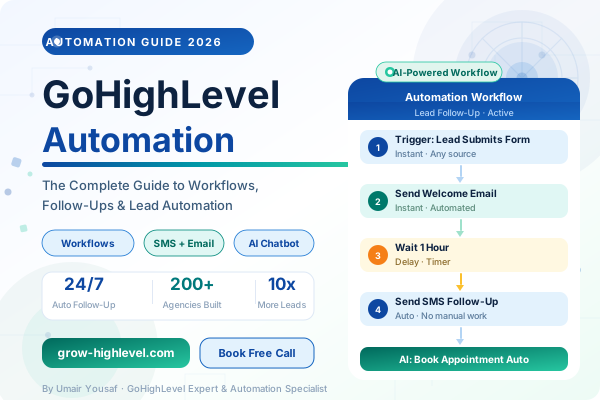
GoHighLevel Automation: Complete Workflow Setup Guide for Agencies (2026)
Most agencies lose leads not because of bad marketing — but because their follow-up is too slow, too inconsistent, or simply never happens. A lead comes in at 11 PM on a Friday. Nobody sends an email. Nobody sends a text. By Monday, that lead has already spoken to three of your competitors.
GoHighLevel automation solves this problem completely. Once your workflows are configured, every lead gets an immediate response — at any hour, any day — without you or your group lifting a finger.
In this guide, I am going to walk you through exactly how GoHighLevel automation works, which workflows every agency should build first, and how to set them up so they run reliably in the background while you focus on closing clients.
If you are still getting started with the platform, read our beginners guide to GoHighLevel first, then come back here for the automation deep dive.
What Is GoHighLevel Automation?
GoHighLevel automation is a workflow-based system that takes action on your behalf based on triggers you define. A trigger is any event — a form submission, a contact tag, a pipeline stage change, a missed appointment — and the workflow is the sequence of actions that follow automatically.
Those actions can include sending an email, firing an SMS, moving a contact to a new pipeline stage, assigning a task to a team member, waiting a set amount of time, or branching into different paths based on whether the contact replied.
Unlike basic email autoresponders, GoHighLevel workflow automation handles email, SMS, calls, internal notifications, and CRM updates all in one connected sequence. That is what makes it genuinely powerful compared to using separate tools for each channel.
Why Automation Matters for Agencies
Before we get into specific workflows, it helps to understand the business case clearly.
The average agency follow-up happens 26–48 hours after a lead comes in. Research consistently shows that responding within five minutes increases conversion rates by 400% compared to responding within an hour. Responding an hour later compared to five minutes already costs you 80% of your potential conversion.
GoHighLevel marketing automation completely closes that gap. Your workflows respond in seconds — with a personalised email and a follow-up SMS — before the lead has even finished browsing another website.
Beyond speed, automation gives your agency consistency. Every lead goes through the exact same sequence regardless of whether your team is busy, on holiday, or dealing with another client. No leads fall through the cracks. No follow-ups are forgotten.
4 GoHighLevel Automation Workflows Every Agency Needs
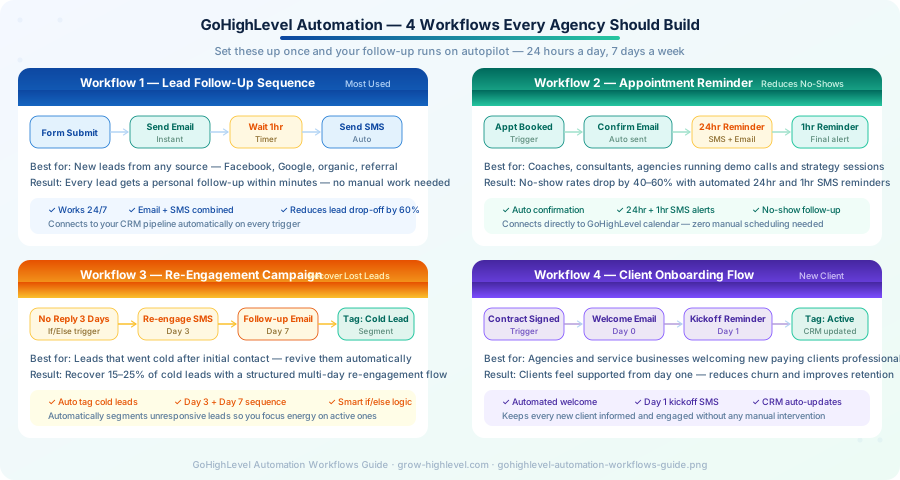
Workflow 1 — Lead Follow-Up Sequence
This is the most important automation you will build and it should be the first one you set up.
How it works: When a new lead submits any form — whether from your funnel, your website, or a Facebook ad — the workflow fires immediately. It sends a welcome email within seconds, waits one hour, then sends an SMS follow-up asking when they are available for a quick call.
If the lead replies to either message, the workflow detects the response and automatically moves them to the "Contacted" stage in your CRM pipeline. If they do not reply, the workflow continues with additional follow-up messages over the next 48 hours before tagging them for a re-engagement campaign.
Why it matters: This single workflow recovers leads that most agencies permanently lose to slow manual follow-up. We have seen clients close 30–40% more deals simply by having this sequence running correctly.
For a complete CRM configuration alongside your automation, see our GoHighLevel CRM setup guide.
Workflow 2 — Appointment Reminder Sequence
Appointment no-shows are one of the most frustrating and common problems for agencies. A slot sits empty, revenue is lost, and your calendar gets disrupted. GoHighLevel appointment automation removes this problem almost entirely.
How it works: When a contact books a call through your GoHighLevel calendar, the workflow immediately sends a confirmation email with the meeting details and calendar invite. Twenty-four hours before the appointment, it sends an SMS reminder. One hour before the call, it sends a final reminder with the meeting link.
If the contact does not show up, the workflow automatically fires a re-booking message within 30 minutes — while your no-show is still in the mindset of the conversation.
Why it matters: Agencies using this workflow report no-show rates dropping from 30–40% down to under 10%. That difference adds up to thousands of dollars in recovered revenue every month.
Workflow 3 — Re-Engagement Campaign
Not every lead will respond to your initial follow-up sequence. Some people opt in, go quiet, and sit in your CRM doing nothing. A re-engagement workflow automatically attempts to bring those contacts back to life.
How it works: The workflow triggers when a contact has had no activity for three days after entering your pipeline. It sends a casual, personalised-sounding SMS — something short and conversational, not a sales pitch. If there is no response after seven days, it sends a follow-up email with a different angle. Contacts who still do not respond after the full sequence are tagged as "Cold Lead" and segmented for a future campaign.
The if/else logic inside GHL automation workflows is what makes this work. The system branches differently for contacts who reply versus those who stay silent, keeping your follow-up relevant and avoiding the spam folder.
Why it matters: Most agencies completely ignore cold leads. A structured re-engagement campaign typically recovers 15–25% of contacts that would otherwise have been lost permanently.
Workflow 4 — Client Onboarding Flow
Automation is not just for lead generation — it is equally valuable after a client signs. A GoHighLevel lead automation sequence that triggers on contract signature sets the right tone from day one.
How it works: When a contact's pipeline stage moves to "Closed Won" or when a contract is signed, the workflow fires a warm welcome email with everything the client needs for the first week. The following morning, it sends an SMS confirming their kickoff call time. On day three, it sends a check-in message asking if they have any questions. The contact is then tagged as "Active Client" in the CRM and the onboarding workflow completes.
Why it matters: Clients who feel professionally onboarded are significantly less likely to churn in the first 90 days. This workflow costs you nothing after it is built and improves client retention without adding any team workload.
How to Set Up GoHighLevel Automation
To build any of these workflows, go to Automation → Create Workflow inside your GoHighLevel account.
The workflow builder uses a drag-and-drop interface where you add triggers and actions step by step. Start simple — build the lead follow-up sequence first, test it with a real submission, and confirm the emails and SMS messages are sent correctly before you move on to the others.
A few important settings to configure before you go live:
Sender details — connect your sending domain and phone number so messages come from your business identity
Wait times — be strategic about delays; too fast feels aggressive, too slow loses momentum
If/else branches — always add a condition for whether the contact replied, so engaged leads are treated differently from silent ones
Workflow goals — set a goal trigger (such as booking a call) so the workflow stops automatically once the contact converts
If you want the full automation setup handled correctly from day one, our team offers a complete done-for-you automation service. You brief us, we build it, and you go live with tested workflows — not half-built sequences.
Need a GHL Expert to Build Your Automation?
Most agency owners who attempt GoHighLevel automation setup on their own spend three to four weeks getting workflows to function reliably. Our team builds them in days.
At Grow HighLevel, we have set up automation systems for 200+ agencies across the US and UK. Every workflow we deliver is documented, tested, and explained to your team before hand-off.
Hire a GoHighLevel expert from our team Book a free strategy call and we will map out your automation system See what our clients say
Related Articles:
GoHighLevel CRM Tutorial: Complete Setup Guide for Agencies (2026)
How to Use GoHighLevel: A Beginner-Friendly Step-by-Step Tutorial
© 2026 Grow HighLevel. Not affiliated with GoHighLevel™.