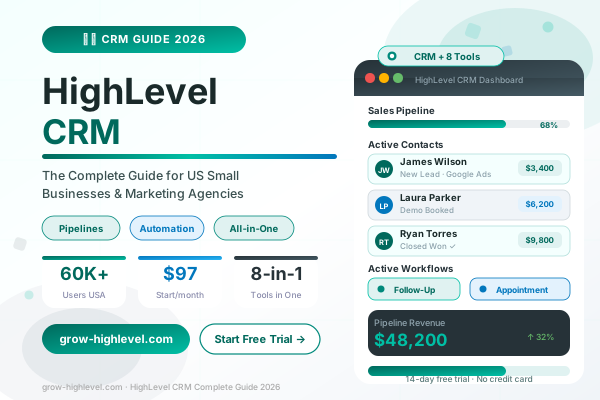
HighLevel CRM: Complete Guide for Small Businesses and Agencies (2026)
Ask any US marketing agency what their biggest operational challenge is and most will give you the same answer — keeping track of leads without losing them. A contact comes in from a Facebook ad at 9 PM on a Friday, nobody follows up until Monday, and by then that lead has already signed with a competitor who responded within the hour.
HighLevel CRM was built to solve that exact problem. It is not just a contact database. It is a complete CRM system with built-in automation, an email and SMS marketing engine, a funnel builder, an appointment scheduler, and a reputation management tool — all working together in one platform, all available to US small businesses and agencies starting at $97 per month.
This guide covers everything you need to know about HighLevel CRM — what it is, what it includes, who it is built for, how it compares to the alternatives, and how to get started.
What Is HighLevel CRM?
HighLevel CRM, also referred to as GoHighLevel, is an all-in-one marketing and sales platform designed primarily for US marketing agencies and small businesses. Unlike traditional CRM tools that only store contact data, HighLevel combines a full CRM with email marketing, SMS automation, workflow builders, funnel pages, calendar booking, AI chatbot, and review management under a single subscription.
The platform was founded in 2018 and has grown to over 60,000 active users, the majority of whom are marketing agencies, local service businesses, coaches, and consultants operating in the US market.
The core idea behind HighLevel is straightforward: every tool you need to attract a lead, follow up automatically, book an appointment, and close a sale should live in one place, integrated by design rather than connected by fragile third-party bridges. When your CRM, your email platform, your SMS tool, and your calendar are all the same system, everything works together without configuration gaps.
What HighLevel CRM Includes
Understanding the full scope of HighLevel's CRM features helps clarify why US agencies choose it over standalone tools.
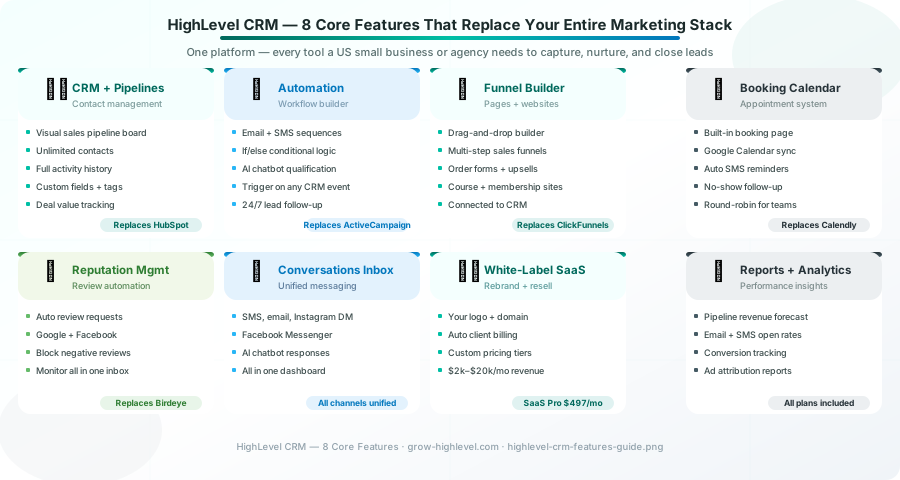
Contact Management and Pipelines
At its core, HighLevel CRM stores every contact your business interacts with — leads, prospects, active clients, and past customers — in a centralised database. Each contact record holds their full history: every email sent, every SMS received, every call logged, every page they visited, and every stage they have moved through in your sales pipeline.
The visual pipeline board shows where every active lead sits in your sales process. You can create custom stages that match your specific sales flow — from New Lead through to Closed Won — and set up automations that move contacts between stages automatically based on their actions.
A key HighLevel CRM feature that standalone tools do not offer is the direct connection between your pipeline and your automation workflows. When a contact reaches a specific pipeline stage, a workflow can fire automatically — sending an email, an SMS, or an internal notification — without any manual trigger.
Email and SMS Automation
HighLevel's automation engine is what separates it from conventional CRMs. You can build multi-step workflows combining email and SMS into a single coordinated sequence. A new lead submits a form, receives a welcome email within seconds, gets an SMS follow-up an hour later, and moves through a 14-day nurture sequence — all automatically, all connected to their contact record in the CRM.
The if/else logic inside HighLevel workflows means the sequence behaves differently depending on how the contact responds. Leads who reply get a different follow-up path than leads who stay silent. Leads who book a call exit the nurture sequence and enter an appointment reminder sequence instead.
For a detailed breakdown of how to build these workflows, see our GoHighLevel automation workflows guide.
Funnel and Website Builder
HighLevel includes a drag-and-drop funnel and website builder. You can create lead capture pages, multi-step sales funnels, order forms, upsell pages, and full business websites — all without third-party tools and all connected directly to the CRM.
Every form submission in a HighLevel funnel creates a contact automatically and triggers whatever workflow you have assigned. There is no Zapier connection to maintain, no integration to break, no manual import process. The funnel, the CRM, and the automation are the same system.
Appointment Booking and Calendar
HighLevel's built-in calendar allows prospects to book appointments directly from your funnel, your website, or a link you share in an SMS. The calendar connects to Google Calendar and Outlook to prevent double-booking, and GoHighLevel's appointment reminder workflows fire automatically to reduce no-shows.
For US agencies and service businesses that sell through consultations and discovery calls, this calendar integration alone often justifies the platform subscription by replacing Calendly and the manual reminder work it previously required.
AI Chatbot and Conversations Inbox
HighLevel includes an AI-powered chatbot that can qualify leads, answer frequently asked questions, and book appointments — 24 hours a day, without any human intervention. All conversations across every channel — SMS, email, Facebook Messenger, Google Business messages, Instagram DMs — are visible in a single unified inbox.
For US small businesses that cannot staff a live chat support function around the clock, the AI chatbot ensures that no lead goes unacknowledged regardless of when they reach out.
Reputation Management
HighLevel automates the review collection process through its reputation management feature. After a service is completed, HighLevel sends an automated review request via SMS or email. Customers who respond positively are directed to your Google Business profile. Customers with a negative experience are directed to a private feedback form, allowing you to resolve the issue before it becomes a public negative review.
For US businesses competing on local search visibility, a consistent stream of new Google reviews generated automatically is one of the most valuable benefits HighLevel provides.
HighLevel CRM vs Other Platforms
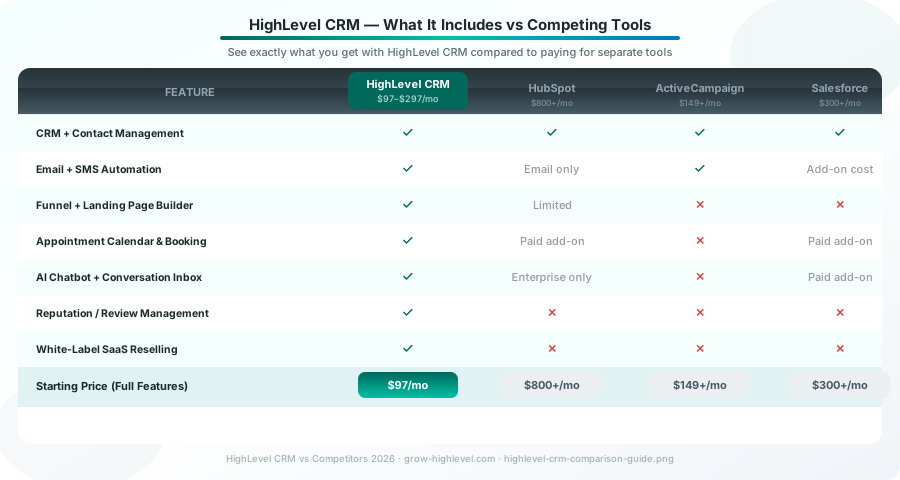
The most common question from US businesses evaluating HighLevel is how it compares to existing tools like HubSpot, ActiveCampaign, and Salesforce.
HighLevel CRM vs HubSpot
HubSpot is the most well-known CRM alternative to HighLevel. HubSpot's free tier is appealing until you need any meaningful marketing automation — at which point the pricing quickly reaches $800 to $3,200 per month for the features HighLevel includes at $97.
HubSpot does not include an SMS marketing tool, a funnel builder, an appointment booking system, or reputation management without additional integrations or paid add-ons. For US agencies managing multiple clients, HubSpot's per-seat pricing makes scaling prohibitively expensive.
HighLevel replaces the core HubSpot use cases — CRM, email automation, pipeline management — and adds the SMS, funnel, calendar, and reputation features HubSpot lacks, at a fraction of the cost.
HighLevel CRM vs ActiveCampaign
ActiveCampaign is a strong email and SMS automation platform, but it is not a CRM in the way HighLevel is. It does not include a funnel builder, a booking calendar, a website builder, or reputation management. For US agencies that need a complete system rather than a standalone automation tool, ActiveCampaign requires significant supplemental tooling.
HighLevel's automation capabilities are comparable to ActiveCampaign's, and HighLevel adds every other layer of the marketing and sales stack that ActiveCampaign lacks.
HighLevel CRM vs Salesforce
Salesforce is the enterprise CRM standard, but its complexity and cost make it unsuitable for most US small businesses and marketing agencies. Salesforce's starter pricing begins at $300 per month per user, requires significant configuration, and typically needs a dedicated admin or consultant to manage.
HighLevel delivers the core pipeline and contact management capabilities most US agencies actually use from Salesforce, at a price point that does not require enterprise-level justification.
For a complete breakdown of HighLevel's plan pricing and which tier fits your agency's size, see our GoHighLevel pricing plans guide.
HighLevel CRM for Small Businesses
HighLevel CRM for small business is a slightly different conversation than HighLevel for agencies. Small business owners — local service providers, coaches, consultants, real estate agents — need the same core capabilities as agencies but typically operate from a single business account rather than managing multiple clients.
For these users, HighLevel's Starter plan at $97 per month provides the complete feature set: CRM, automation, funnel builder, calendar, AI chatbot, and reputation management — all for a single business location.
The practical impact for a typical US small business is replacing four to six separate tools with one subscription. A plumbing company running HighLevel replaces its separate CRM, email marketing tool, SMS platform, and review management service — typically saving $150 to $400 per month in software costs while running everything from one dashboard.
HighLevel CRM Pricing
HighLevel CRM is available on three plans:
All plans include the full HighLevel feature set. The difference between Starter and Unlimited is scale — the Unlimited plan removes sub-account limits and adds the agency dashboard and snapshot templates that allow agencies to manage multiple clients efficiently.
A 14-day free trial is available on all plans with no credit card required, which gives you enough time to build a pipeline, configure an automation workflow, and verify the platform delivers value before committing.
How to Get Started with HighLevel CRM
Getting HighLevel configured correctly from the start saves weeks of rework later. The foundation steps are account settings, CRM pipeline configuration, custom field and tag setup, and your first automation workflow.
Our step-by-step CRM setup guide covers the full configuration process in detail. For US agencies getting started with HighLevel for the first time, following that process in sequence — rather than jumping straight into funnel building — creates a stable CRM architecture that supports everything else you build.
If you want the setup handled professionally, our team at Grow HighLevel offers done-for-you CRM setup services covering full account configuration, pipeline build, automation workflows, and testing.
You can also hire a GoHighLevel expert for a specific project, or book a free strategy call to discuss which setup approach makes sense for your business.
Related Articles:
GoHighLevel CRM Setup: Step-by-Step Configuration Guide (2026)
GoHighLevel Pricing Plans 2026: Which Plan Is Right for Your Agency?
© 2026 Grow HighLevel. Not affiliated with GoHighLevel™.
